
How to Let Agents Write Convex Blog CMS Posts with MCP
A practical implementation guide for wiring Convex Blog CMS to an MCP server so agents can create drafts, update metadata, and replace the full blog body safely.
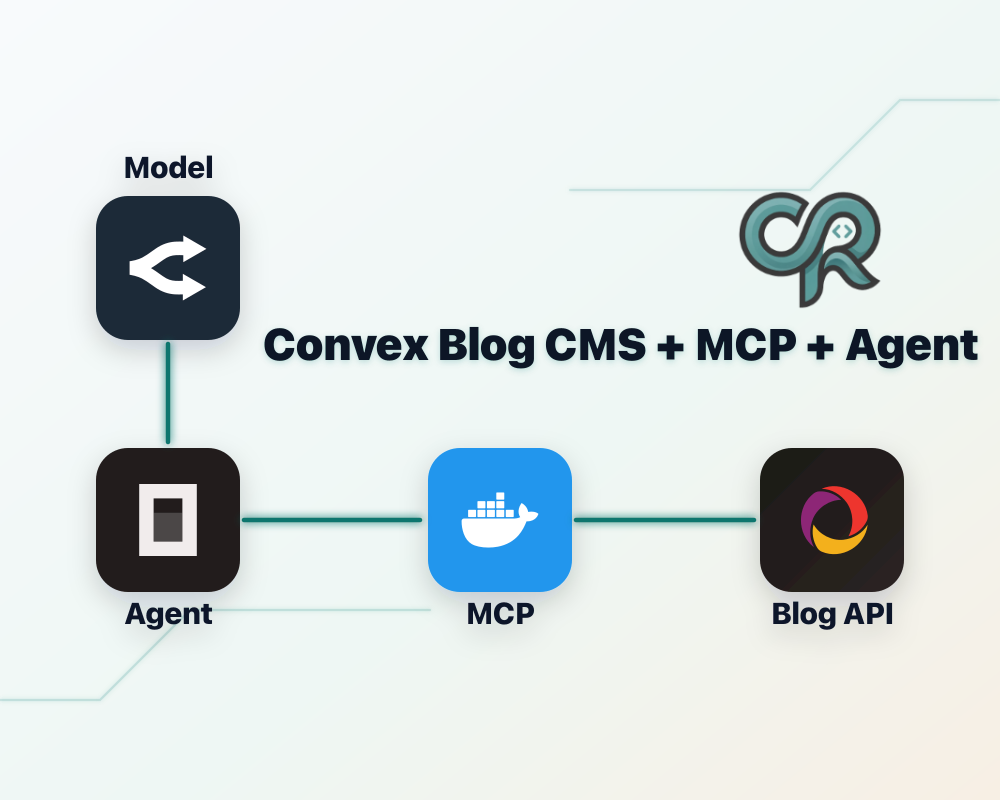
Most agent demos stop at "the model can write Markdown." That is the easy part. The useful version is an agent that can open your real CMS, create a draft, update SEO fields, and replace the article body through a tool surface small enough that you can reason about it.
This guide shows the implementation I ended up using for my site: SvelteKit on the frontend, Convex as the backend, Convex Blog CMS for the blog data model, and a small MCP server that exposes blog-admin operations to agents. The important modification is that I did not stop at the default metadata operations. I exposed replacePostBlocks, because without it the agent can create a shell of a post but cannot reliably write or revise the actual body.
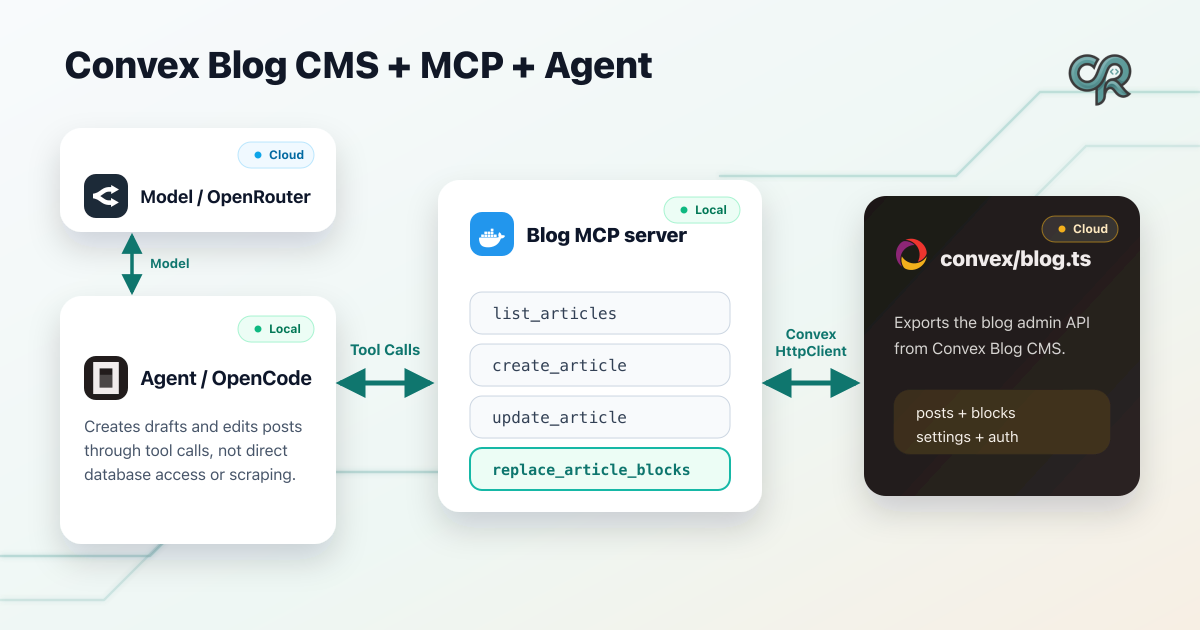
What you are building
The finished flow looks like this:
- Your SvelteKit site reads published posts from Convex.
- Convex Blog CMS owns the post tables and block storage.
- A host module at
convex/blog.tsexports the blog admin functions. - A separate MCP service calls those Convex functions with
[ConvexHttpClient](https://docs.convex.dev/client/javascript/overview#http-client). - Agents get four narrow tools: list articles, create article, update article metadata, and replace article blocks.
The last tool is the difference between "agent as autocomplete" and "agent as publisher." A blog post body is not a side effect of the title. It is its own data structure, and the agent needs an explicit write path for it.
1. Install and mount the Convex Blog CMS component
First, mount the blog CMS component in your Convex app config. This follows the normal Convex components setup: create or update convex.config.ts, call defineApp, and install the component with app.use. In my repo this lives at src/convex/convex.config.ts:
import betterAuth from "@convex-dev/better-auth/convex.config";
import blogCms from "basic-blog-convex-blog-cms/convex.config.js";
import { defineApp } from "convex/server";

const app = defineApp();

app.use(betterAuth);
app.use(blogCms);

export default app;
That gives the host app the Convex component, but it does not yet give your MCP server anything stable to call. For that, create a host module that re-exports the admin API.
2. Export a stable blog admin module
My MCP server assumes the Convex module is named blog, so I keep the host file at src/convex/blog.ts. If you rename it, you can still support that with CONVEX_BLOG_MODULE, but keeping the default avoids pointless configuration.
The key is to export every operation the MCP server needs, including replacePostBlocks:
import { makeBlogAdminAPI } from "basic-blog-convex-blog-cms";
import { ConvexError } from "convex/values";
import { components } from "./_generated/api";
import { resolveStrictBlogAdminApiKey } from "./blogAuth";

const blogAdminApiKeySecret =
  process.env.BLOG_ADMIN_API_KEY?.trim() || undefined;

export function useStrictBlogAdminApiKey() {
  return resolveStrictBlogAdminApiKey({
    adminApiKeySecret: blogAdminApiKeySecret,
    convexDeployment: process.env.CONVEX_DEPLOYMENT?.trim(),
    nodeEnv: process.env.NODE_ENV,
  });
}

export const {
  getPublishedPostBySlug,
  listPublishedPosts,
  getPublicSiteSettings,
  getPostForAdmin,
  listPostsForAdmin,
  createPost,
  updatePost,
  publishPost,
  unpublishPost,
  deletePost,
  replacePostBlocks,
  upsertSiteSettings,
  generateUploadUrl,
} = makeBlogAdminAPI(components.blogCms, {
  adminApiKeySecret: blogAdminApiKeySecret,
  strictAdminApiKey: useStrictBlogAdminApiKey(),
  auth: async (ctx) => {
    const identity = await ctx.auth.getUserIdentity();
    if (!identity) {
      throw new ConvexError({
        code: "UNAUTHORIZED",
        message: "Authentication required",
      });
    }
  },
});
That shared admin key matters for non-interactive agents. A logged-in admin UI can use user auth. A background MCP process usually cannot. Passing BLOG_ADMIN_API_KEY through the MCP service gives Convex a server-side credential you can rotate and keep out of prompts.
3. Keep the public read path boring
The frontend should not know or care that agents exist. Public pages read published posts exactly like any other Convex-backed SvelteKit page. In this setup, the data loading happens in a SvelteKit server load function, which keeps the Convex URL and server-only fetch path out of the browser.
In my blog route, the server load calls getPublishedPostBySlug and passes the returned blocks into a renderer:
import type { PageServerLoad } from "./$types";
import { error } from "@sveltejs/kit";
import { ConvexHttpClient } from "convex/browser";
import { CONVEX_URL } from "$env/static/private";
import { api } from "../../../convex/_generated/api";
import { absoluteUrlFromSite } from "basic-blog-convex-blog-cms/next";

const convex = new ConvexHttpClient(CONVEX_URL);

export const load: PageServerLoad = async ({ params, url }) => {
  const [postData, siteSettings] = await Promise.all([
    convex.query(api.blog.getPublishedPostBySlug, { slug: params.slug }),
    convex.query(api.blog.getPublicSiteSettings, {}),
  ]);

  if (!postData) {
    error(404, "Blog post not found");
  }

  const canonicalPath =
    postData.post.canonicalPath?.trim() || `/blog/${postData.post.slug}`;

  return {
    post: postData.post,
    blocks: postData.blocks,
    siteSettings,
    canonicalUrl:
      absoluteUrlFromSite(siteSettings ?? null, canonicalPath) ??
      new URL(canonicalPath, url.origin).toString(),
  };
};
This separation is worth preserving. Agents write through admin tools. Readers read through published-post queries. Do not make your public rendering path depend on MCP.
4. Render blocks as sanitized HTML
The CMS body is an ordered list of blocks. On my site, paragraph blocks are treated as Markdown and then sanitized; heading blocks are escaped and clamped; media blocks render through explicit cases.
The important part is that rendering is deterministic and defensive:
export function renderBlogBlocksToHtml(
  blocks: Array<{ order: number; block: BlockDTO }>,
): string {
  const html = blocks
    .toSorted((left, right) => left.order - right.order)
    .map(({ block }) => {
      switch (block.type) {
        case "paragraph":
          return renderMarkdownToHtml(block.text);
        case "heading": {
          const level = Math.min(Math.max(block.level, 1), 4);
          return `<h${level}>${escapeHtml(block.text)}</h${level}>`;
        }
        case "image":
          return `<figure><img src="${escapeHtml(block.url)}" alt="${escapeHtml(block.alt)}" /></figure>`;
        case "video":
          return block.caption
            ? renderLink(block.url, block.caption)
            : renderLink(block.url, "Watch video");
        case "link":
          return renderLink(block.url, block.title?.trim() || block.url);
      }
    })
    .join("\n");

  return sanitizeHtml(html, BLOG_HTML_OPTIONS);
}
This means agents can send normal Markdown inside paragraph blocks, including fenced code examples, but the frontend still owns sanitization and final HTML.
5. Build a Convex bridge for the MCP server
The MCP service does not import your app's generated Convex files. That would couple the service to one checkout and one generated API snapshot. Instead, it uses the Convex JavaScript client, specifically ConvexHttpClient.
Here is the bridge shape from services/convex-blog-mcp/src/convexBlog.ts:
import { ConvexHttpClient } from "convex/browser";
import { anyApi } from "convex/server";

type BlogAdminModuleApi = {
  listPostsForAdmin: (typeof anyApi)["blog"]["listPostsForAdmin"];
  createPost: (typeof anyApi)["blog"]["createPost"];
  updatePost: (typeof anyApi)["blog"]["updatePost"];
  replacePostBlocks: (typeof anyApi)["blog"]["replacePostBlocks"];
};

function blogAdminModule(moduleName: string): BlogAdminModuleApi {
  const mod = (anyApi as unknown as Record<string, unknown>)[moduleName];
  if (typeof mod !== "object" || mod === null) {
    throw new Error(
      `Invalid CONVEX_BLOG_MODULE "${moduleName}": not a module on anyApi`,
    );
  }

  const m = mod as Record<string, unknown>;
  if (
    !m.listPostsForAdmin ||
    !m.createPost ||
    !m.updatePost ||
    !m.replacePostBlocks
  ) {
    throw new Error(
      `Invalid CONVEX_BLOG_MODULE "${moduleName}": expected listPostsForAdmin, createPost, updatePost, replacePostBlocks`,
    );
  }

  return mod as BlogAdminModuleApi;
}
That startup check is intentionally strict. If the host Convex app does not export replacePostBlocks, the MCP server should fail loudly. A half-working blog tool is worse than no blog tool, because the agent will think it can do the job and then silently leave you with empty shells.
6. Pass the admin key on every Convex call
The bridge appends adminApiKey when the MCP service has BLOG_ADMIN_API_KEY configured. This still uses normal Convex queries and mutations through the HTTP client; the admin key is just an argument your host module validates.
export function createBlogConvexBridge(env: {
  convexUrl: string;
  blogModule: string;
  adminApiKey?: string;
}) {
  const client = new ConvexHttpClient(env.convexUrl);
  const api = blogAdminModule(env.blogModule);

  function withAdmin<T extends Record<string, unknown>>(
    args: T,
  ): T & { adminApiKey?: string } {
    if (env.adminApiKey === undefined) {
      return args;
    }
    return { ...args, adminApiKey: env.adminApiKey };
  }

  return {
    async listPosts(limit?: number) {
      return await client.query(api.listPostsForAdmin, withAdmin({ limit }));
    },
    async createPost(args: {
      slug: string;
      title: string;
      authorName?: string;
      excerpt?: string;
    }) {
      return await client.mutation(api.createPost, withAdmin(args));
    },
    async updatePost(postId: string, patch: Record<string, unknown>) {
      return await client.mutation(
        api.updatePost,
        withAdmin({ postId, patch }),
      );
    },
    async replacePostBlocks(
      postId: string,
      blocks: Array<{ order: number; block: Record<string, unknown> }>,
    ) {
      return await client.mutation(
        api.replacePostBlocks,
        withAdmin({ postId, blocks }),
      );
    },
  };
}
Notice that the MCP layer is not making authorization decisions about which posts are allowed. It only authenticates itself and forwards a narrow operation to Convex. Convex remains the source of truth for admin write authorization.
7. Define the MCP tools agents actually need
The server uses the official MCP TypeScript SDK to register tools and Zod to validate tool inputs. The surface stays small on purpose:
list_articles: find drafts and retrieve post ids.create_article: create the initial draft shell.update_article: patch top-level metadata only.replace_article_blocks: replace the full ordered body.
The body tool takes explicit block objects. This is the core schema:
const blockSchema = z.union([
  z.object({
    type: z.literal("paragraph"),
    text: z.string(),
  }),
  z.object({
    type: z.literal("heading"),
    level: z.number(),
    text: z.string(),
  }),
  z.object({
    type: z.literal("image"),
    url: z.string(),
    alt: z.string(),
    width: z.number().optional(),
    height: z.number().optional(),
  }),
  z.object({
    type: z.literal("video"),
    url: z.string(),
    poster: z.string().optional(),
    caption: z.string().optional(),
  }),
  z.object({
    type: z.literal("link"),
    url: z.string(),
    title: z.string().optional(),
    rel: z.string().optional(),
    nofollow: z.boolean().optional(),
  }),
]);
Then register replace_article_blocks as a full-body replacement, not a patch:
server.registerTool(
  "replace_article_blocks",
  {
    description:
      "Replace the full body (ordered blocks) of a blog post by id.",
    inputSchema: {
      postId: z.string(),
      blocks: z.array(
        z.object({
          order: z.number(),
          block: blockSchema,
        }),
      ),
    },
  },
  async ({ postId, blocks }) => {
    await bridge.replacePostBlocks(postId, blocks);
    return jsonResult({ ok: true });
  },
);
This is the repo modification that made the setup useful for real drafting. The default create/update flow can manage the record. It cannot produce a complete article body unless the body itself is exposed as a writable structure.
8. Support stdio and HTTP transports
MCP defines both stdio and Streamable HTTP transports. For local coding agents, stdio is the simplest path:
import { StdioServerTransport } from "@modelcontextprotocol/sdk/server/stdio.js";
import { createBlogConvexBridge } from "./convexBlog.js";
import { createBlogMcpServer } from "./createBlogMcpServer.js";
import { loadStdioEnv } from "./env.js";

async function main() {
  const env = loadStdioEnv();
  const bridge = createBlogConvexBridge(env);
  const server = createBlogMcpServer(bridge);
  const transport = new StdioServerTransport();
  await server.connect(transport);
}

main().catch((err) => {
  console.error(err);
  process.exit(1);
});
For hosted agents or multiple clients, expose Streamable HTTP at /mcp and put a bearer token in front of it:
if (env.mcpBearerToken) {
  const token = env.mcpBearerToken;
  app.use("/mcp", (req, res, next) => {
    const auth = req.headers.authorization;
    if (auth !== `Bearer ${token}`) {
      res.status(401).json({ error: "Unauthorized" });
      return;
    }
    next();
  });
}

app.post("/mcp", async (req, res) => {
  const server = createBlogMcpServer(bridge);
  const transport = new StreamableHTTPServerTransport({
    sessionIdGenerator: undefined,
  });
  await server.connect(transport);
  await transport.handleRequest(req, res, req.body);
});
There are two different secrets here and they solve different problems. MCP_BEARER_TOKEN protects the public MCP endpoint. BLOG_ADMIN_API_KEY authorizes the MCP service when it writes to Convex.
9. Configure the environment
The MCP service needs only a few variables:
CONVEX_URL="https://YOUR_DEPLOYMENT.convex.cloud"
BLOG_ADMIN_API_KEY="your-convex-admin-secret"
CONVEX_BLOG_MODULE="blog" # optional; default is blog
MCP_BEARER_TOKEN="your-http-mcp-secret" # HTTP transport only
PORT="3000" # HTTP transport only
For local stdio, CONVEX_URL is required and BLOG_ADMIN_API_KEY is required if your Convex host enforces strict admin-key auth. For HTTP, set MCP_BEARER_TOKEN if the endpoint is reachable outside your machine. In production, that should be the default.
10. Add the MCP server to Codex or OpenCode
For Codex MCP configuration, a local Docker-backed stdio server looks like this. The Docker part is ordinary image packaging; the official Dockerfile docs are worth reading if you have not built a small service image before.
docker build -t convex-blog-mcp -f services/convex-blog-mcp/Dockerfile services/convex-blog-mcp

codex mcp add convex-blog \
  --env CONVEX_URL="https://YOUR_DEPLOYMENT.convex.cloud" \
  --env BLOG_ADMIN_API_KEY="your-secret" -- \
  docker run -i --rm -e CONVEX_URL -e BLOG_ADMIN_API_KEY convex-blog-mcp
For a hosted HTTP server, add a block to ~/.codex/config.toml:
[mcp_servers.convex-blog]
url = "https://YOUR_DOMAIN/mcp"
bearer_token_env_var = "CONVEX_BLOG_MCP_TOKEN"
Then export CONVEX_BLOG_MCP_TOKEN in the shell or environment where Codex runs. That token should match MCP_BEARER_TOKEN on the MCP service.
If you use OpenCode instead, wire the same service through the OpenCode MCP server config. If you want a dedicated writer or publisher persona, define it with the OpenCode agents docs and enable only this blog MCP server for that agent. That keeps the content-writing agent focused and keeps unrelated MCP tools out of its context.
11. Teach the agent the write protocol
The tool surface is small, but the agent still needs a protocol. I use this order:
- Call
list_articlesto find the draft or confirm the slug is available. - Call
create_articleonly if the draft does not exist. - Call
update_articlefor metadata: title, excerpt, meta description, canonical path, FAQ, takeaways. - Call
replace_article_blockswith the entire article body. - Leave
status: "draft"until a human review or a separate publish step.
A body replacement call should look like this:
{
  "postId": "j970xakkrcbwrsxqgh0asb3k1d886f0t",
  "blocks": [
    {
      "order": 0,
      "block": {
        "type": "heading",
        "level": 2,
        "text": "Start with the Convex host module"
      }
    },
    {
      "order": 1,
      "block": {
        "type": "paragraph",
        "text": "Export `replacePostBlocks` alongside `createPost` and `updatePost`."
      }
    }
  ]
}
The body replacement is intentionally all-or-nothing. That makes it easy to audit and easy to retry. Partial append-style tools sound convenient, but they create messy failure modes: duplicated sections, missing order values, and agents trying to surgically edit content they have not actually loaded.
12. Test the integration in layers
Do not debug the whole stack at once. Test each boundary separately.
First, confirm the Convex host exports what the MCP bridge expects. If CONVEX_BLOG_MODULE=blog, the module must expose:
listPostsForAdmin
createPost
updatePost
replacePostBlocks
Second, run the MCP service locally and check that it fails fast when configuration is missing:
pnpm --filter @basic-blog/convex-blog-mcp run build
CONVEX_URL="https://YOUR_DEPLOYMENT.convex.cloud" \
BLOG_ADMIN_API_KEY="your-secret" \
pnpm --filter @basic-blog/convex-blog-mcp run start:stdio
Third, use an MCP client to call list_articles. Do not create content until listing works. If listing fails, body replacement will fail too.
Fourth, create a throwaway draft and replace its body with two or three blocks. Verify the public route still hides drafts, then publish only after the admin UI or Convex state looks right.
If you deploy the HTTP transport on Railway, pay attention to the service root. Railway’s monorepo deployment docs explain why the root directory and start command matter when the MCP server lives inside a larger repo.
Common failure modes
The most common mistake is exposing only createPost and updatePost. That gives agents enough access to create metadata, but not enough access to write the article. You end up with a CMS full of drafts that have titles and empty bodies.
The second mistake is treating replacePostBlocks as an append operation. It is not. Send the full ordered body every time.
The third mistake is mixing security concerns. The MCP bearer token protects the MCP transport. The Convex admin key protects Convex writes. Use both when the MCP server is deployed publicly.
The fourth mistake is making the MCP service depend on generated files from the host app. anyApi avoids that. The service only needs to know the Convex URL and module name.
The fifth mistake is letting the agent publish by default. Draft creation and body editing are useful automation. Publishing is a separate trust decision.
The practical takeaway
The design is not complicated, and that is the point. Convex remains the database and authorization boundary. Convex Blog CMS remains the content model. SvelteKit renders published content. MCP exposes a narrow operational API for agents.
The important implementation choice is giving the agent a real body-writing primitive. replacePostBlocks turns the MCP server from a metadata editor into a publishing tool. Once that exists, the rest of the system becomes ordinary engineering: validate inputs, keep secrets out of prompts, render defensively, and make every write explicit enough that a human can review what happened.
This pattern isn’t limited to blogging. By providing agents with narrowly scoped tools and explicit write paths, we can extend automation across our apps—from lead and contact management to other repetitive workflows. It’s a blueprint for how AI can handle real work in web apps, freeing us to focus on strategy and creativity.